By Joseph Mmadu
Date: 27/05/2019
Research shows that a lot of Student do there online course registration lately, some days before exam, or even Exam day, due to queue in school portal, the computer center by the side also known as mini portal, and chances to visit those places and lots of excuses, which here am to discuss on the steps of registering your courses online, in your comfort, with your Android phone or any browsing gadget at your reach.
STEP 1: Log on to the school portal by clicking the link bellow
MOUAU PORTAL
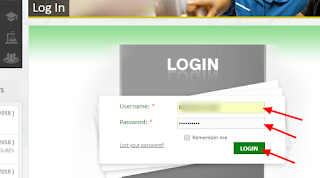
STEP 2: Login to your Profile
STEP 3: Input your details, the login USERNAME and PASSWORD is your BIO-DATA. That gives you access to your profile.
STEP 4: Click on the login button and boom you are on your profile.
STEP 5: Click on the Registration by the left hand and there will be a drop down,
STEP 6:Click on Course Registration on the drop down and register your courses
STEP 7: Click on the Submit button and you are done.
Thanks for reading...
Share if you really find it helpful
kindly hit the share button down

TO THE
NUMBER1 NEWS HUB KINDLY COMMENT BELLOW
SHARE AND SUBSCRIBE WITH EMAIL FOR OUR NEWSLETTER.
THANKS.


 TO THE NUMBER1 NEWS HUB IF YOU THINK THIS POST WILL BE HELPFUL TO SOMEBODY ELSE, KINDLY COMMENT BELLOW


 TO THE NUMBER1 NEWS HUB IF YOU THINK THIS POST WILL BE HELPFUL TO SOMEBODY ELSE, KINDLY COMMENT BELLOW


 TO THE NUMBER1 NEWS HUB IF YOU THINK THIS POST WILL BE HELPFUL TO SOMEBODY ELSE, KINDLY COMMENT BELLOW